• How to Simulate Break Key Sequence in a Cisco Router

      2 comments

    When would you need this: When you are recovering a lost password and the usual ‘Ctrl-Break’ key combination is not working.

    Special Requirements: None.

    First of all, you have to make sure that you are pressing the correct key sequence. There are few, slightly different, keys to press to break the router boot sequence in different routers and different terminal emulation software. The table below shows the complete list of different keystrokes to interrupt the router boot sequence.
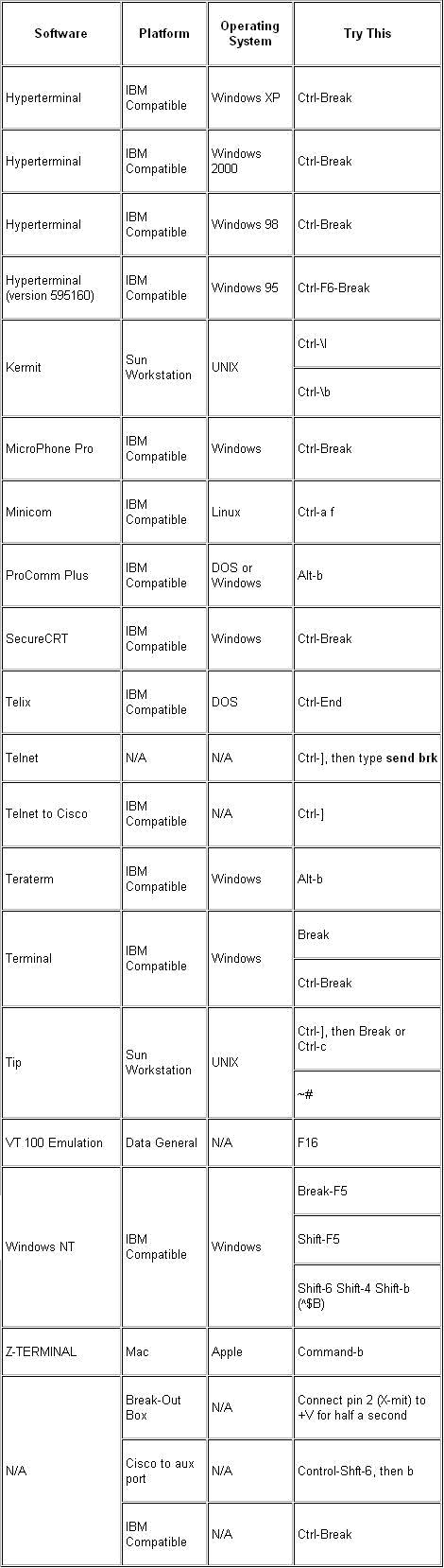
    breaksequence


    The auxiliary (AUX) port is not active during the boot sequence of a router. Therefore, it is no use if you send a break through the AUX port. You need to have connection to the console port, and have these settings:

    Baud rate: 9600

    Parity: None

    Data bits: 8

    Stop bits: 1

    Flow control: None

    Until here, things are supposed to be going smooth. If you have everything set right, and you press the correct key strokes during router initialization (this is usually within the first 60 seconds), you will be transferred to the ROM Monitor mode.

    If the above is not working, you might consider the following notes:

    • If you are using the hyperterminal of Windows NT, you might consider upgrading the hyperterminal. Some versions of Windows NT have hyperterminal software that cannot send the correct break key signal. Visit this link for the upgrade: http://www.hilgraeve.com/htpe/index.html
    • If you are using a DB9-to-USB converter to connect to the console port, you might need to connect to a DB9 port directly. Not all converters of this type can convey the correct break sequence.
    • If you still do not know the exact reason why this is not working, you should consider simulating the break key sequence.

    To simulate the break key sequence, go through the following steps carefully:

    1. Connect to the router with these terminal settings:

    Baud rate: 1200

    Parity: None

    Data bits: 8

    Stop bits: 1

    Flow control: None

    You will no longer see any output on your screen, and this is normal.

    2. Power cycle (switch off and then on) the router and press the SPACEBAR for 10-15 seconds in order to generate a signal similar to the break sequence.

    3. Disconnect your terminal, and reconnect with a 9600 baud rate. You enter the ROM Monitor mode.

    If all of this fails, you should consider trying a different PC or emulation software.


    Write a comment